Find a bar, see tonight's events, catch up with friends, or jump into BULA RUSH. All In brings more of your kava world together on Home, alongside the Home experiences you already know.
One screen, nine lanes
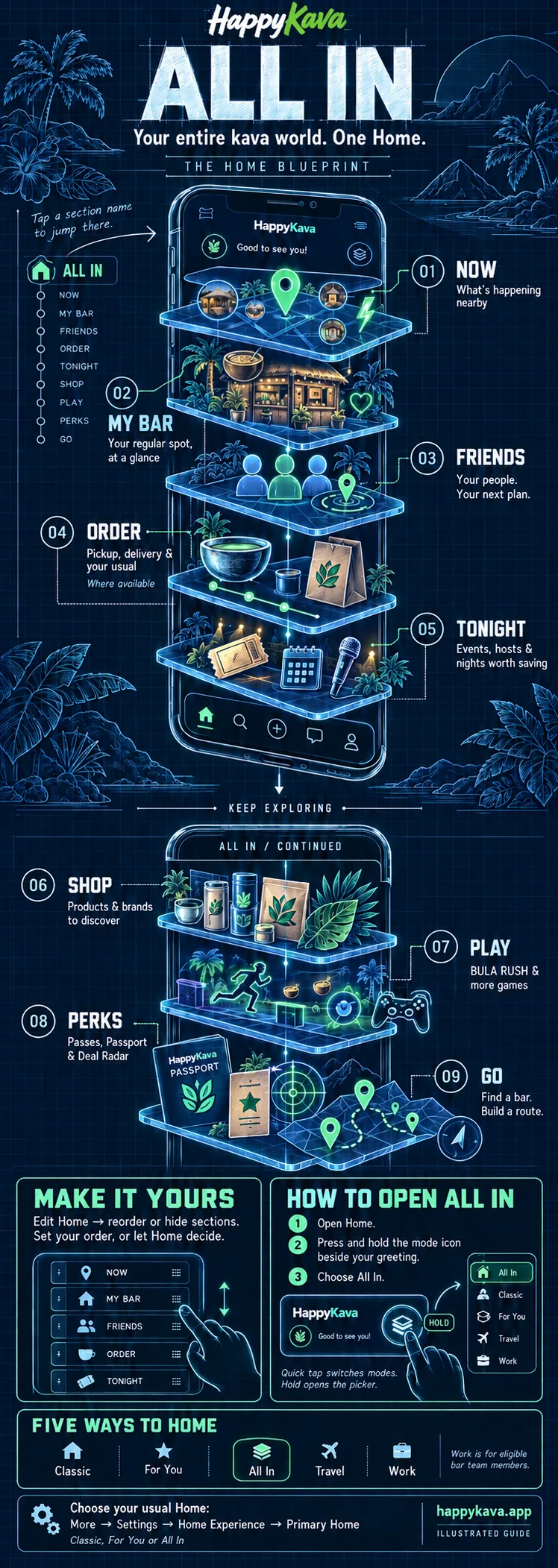
All In is a stack of lanes under a rail: Now, My bar, Friends, Order, Tonight, Shop, Play, Perks and Go. Tap a name on the rail to jump to that lane. As you scroll, the rail marks the lane on screen.
The Order lane appears where nearby bars take orders. While you're checked in, My bar moves forward; an active order stays within reach.
Pick the Home that fits
- All In: bars, deals, friends, events, games, shopping and more together, with sections you can arrange.
- Classic: the familiar Home for browsing bars and what's happening nearby.
- For You: a more focused, personalized Home.
- Travel: explore a city, shortlist bars and build a route.
- Work: check-ins, scanning, orders and shift tools for eligible bar team members. It appears when your account has an active staff role.
How to switch
Open Home, then press and hold the mode icon beside your greeting. Tap the experience you want in the picker. A quick tap on the icon switches modes; holding it opens your choices.
To set your usual Home, open More → Settings → Home Experience → Primary Home and choose Classic, For You or All In. Under Available from Home, choose which experiences appear in the switcher. Enable a Home there first if its Primary Home option is dimmed.
Make it yours
Tap Edit Home on the rail to move or hide lanes. Once you move a lane, Home keeps the order you set until you tap "Let Home decide again".
Also improved
- Deal passes show the right availability window and times for the bar's time zone.
- Pass screens and links to ended deals no longer dead-end.
- The BULA RUSH card on the check-in sheet no longer overlaps the rest of the sheet.