

Your Bar Comes First
Keep the place you care about most closer to the top of your HappyKava experience.
Your Home Bar by HappyKava
There is a kava bar you know differently from all the others.
Choose your Home Bar to bring its atmosphere, upcoming events, and available offers closer to the top of your app.
Available in the HappyKava app for iOS and Android.
A familiar face.
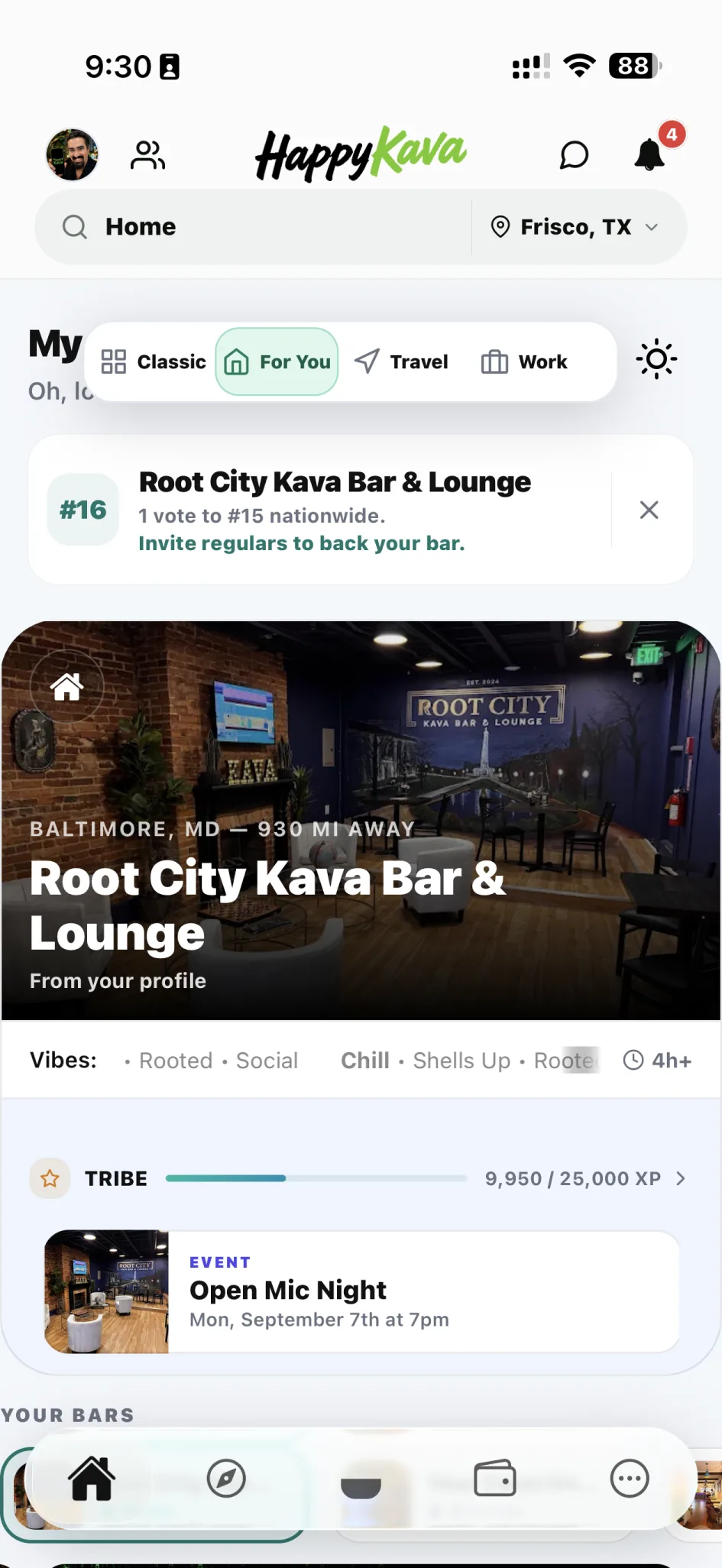
Your place, a little closer.
Keep the place you care about most closer to the top of your HappyKava experience.
See relevant posted deals, events, Passport availability, and live bar context sooner.
Stay connected to the people, progress, and experiences that make the bar feel like yours.
The Story
You could visit the same kava bar three times a week and still have to search for it like you had never been there before.
You opened one app for the address. Another for social posts. You checked a group chat to see whether anyone was going. You searched for an event flyer you remembered seeing two days ago. You wondered whether happy hour had already ended, whether tonight was quiet, or whether the room was packed for an event you somehow missed.
Sometimes you arrived five minutes after a deal ended. Sometimes you stayed home because nothing appeared to be happening, then found out later that everyone you knew had been there.
The people there knew you. The app did not.
More Than A Favorite
You may save several bars. You may visit different places around town, use TravelRoot on the road, or explore participating Passport locations across the country.
Your Home Bar is the one bar HappyKava treats as your primary connection, the place that should be easiest to recognize, easiest to revisit, and easiest to understand at a glance.
It is not a restriction. It is an anchor.
What Your Home Bar Brings Closer
Recurring happy hour, open mic, tournament, live music, community meetup, themed night, or one-time special. Your Home Bar gives relevant posted deals and events a place to find you sooner.
Some nights you want a lively room. Some nights you want a quiet shell, an outlet, and enough table space to open your laptop. Available vibe and activity context helps you decide with more than hours and an address.
When a bar shares public on-shift information, Your Home Bar can bring familiar faces into view so the bar stops feeling like a listing and starts feeling like the room you know.
A posted deal, an event, or a Passport Shell can rise above the noise without making every night look urgent.
When personal progress is available, HappyKava can keep check-ins, Passport moments, and relationship context visible alongside the bar itself.
A Night With Your Home Bar
"Anything happening at the bar tonight?"
Before Your Home Bar, that question starts a scavenger hunt: social posts, group chats, hours, event flyers, and a message to someone who might already be there.
With Your Home Bar, you open HappyKava. The bar is already there. You see the event it posted, the relevant deal, a current vibe update if one is available, and maybe a familiar face on shift.
The feature does not replace the bar. It removes the friction between wondering about the bar and walking through its door.
Why It Feels Different
The bar you return to does not have to fight for your attention every time you open HappyKava.
Your Home Bar stays close without hiding nearby bars, TravelRoot, Passport, strains, events, or the rest of the kava community.
Relevant activity can appear when there is something meaningful to show instead of filling the experience with generic status cards.
Choose a Home Bar yourself, change it when your routine changes, or reset it when you no longer want a primary bar.
How It Fits
Save many bars. Call one home.
Exploration starts somewhere familiar.
Your Home Bar is the anchor. TravelRoot is the road.
Made For Real Regulars
How It Works
Search HappyKava for the kava bar you consider your regular spot.
Save the bar to your profile so HappyKava knows which location should receive primary placement.
See the Home Bar and any relevant posted activity available for that moment.
Review bar details, current deals, events, Passport information, directions, check-in options, and other available features.
Moved across town? Found a new regular spot? Choose another Home Bar or reset the preference at any time.
Before And After
Your regular bar was still buried in discovery.
The app starts from your real kava life.
A kava bar becomes a Home Bar slowly. It happens one shell at a time.
You learn the room. The room learns you. You recognize the cars outside, the voices at the counter, and the people who will probably be sitting in their usual places.
Eventually, you stop deciding where to go. You decide whether you are going to the bar.
FAQ
Your Home Bar is the kava bar you choose as your primary regular spot in HappyKava. It gives that bar a more prominent role in your personalized app experience and helps bring relevant bar information closer.
No. You can save multiple favorite bars, but Your Home Bar identifies one primary bar. Favorites are your collection; Your Home Bar is your anchor.
HappyKava currently treats one bar as Your Home Bar at a time. You can still save and visit as many other bars as you like.
Sign in to HappyKava, open the Home Bar picker from an available Home Bar management entry point, search for the bar, select it, and save your choice.
Yes. Choose another bar whenever your regular spot changes. Your new selection replaces the previous Home Bar.
Yes. The Home Bar picker includes a reset option that clears your saved Home Bar without deleting your account, favorites, or visit history.
HappyKava may still surface a useful bar based on available personalization and location signals, but choosing a Home Bar yourself gives you direct control over which bar receives primary placement.
Depending on available data, the area may include bar imagery, relevant posted deals or events, Passport redemption context, live vibe information, public staff-on-shift information, and personal progress.
No. Live context depends on available and recent information. When no useful vibe signal exists, HappyKava should not imply that it knows how the room currently feels.
Public on-shift information may appear when the bar uses supported staff tools and makes that information available. Not every bar or shift will have a visible roster.
It can bring forward active or relevant deals posted through HappyKava. Deal schedules and availability are controlled by the bar and can change, so review the current details before making a special trip.
Yes, relevant upcoming or active events posted for the bar can appear in the Home Bar experience when available.
Yes. When your Home Bar participates in Passport and your account has a relevant redemption opportunity, Passport can receive priority in the Home Bar promotion area.
Not by itself. It is a personalization feature that identifies your primary bar. Check-ins, Passport, Regulars, deals, and other HappyKava features may add separate progress, perks, or redemption experiences.
No. Choosing a Home Bar saves a profile preference. It does not confirm that you are physically at the bar. Check-in remains a separate action with its own eligibility and location rules.
No. Deals, Passport Shells, and other benefits keep their own redemption rules. Setting a Home Bar only changes how the bar is prioritized in your HappyKava experience.
Yes. Your Home Bar does not limit search, nearby discovery, Passport exploration, TravelRoot routes, events, strains, favorites, or any other bar.
Your Home Bar remains saved to your profile. During an active TravelRoot trip, HappyKava may prioritize active-trip information so your current route and next stop remain easy to reach.
Yes. A HappyKava account is required to save, change, or reset Your Home Bar across your personalized experience.
The core Your Home Bar experience is part of the HappyKava app on iOS and Android. Platform-specific extensions or widgets may vary.
HappyKava may fall back to another useful bar rather than keeping an unavailable location in the primary Home Bar position. You can also open the picker and choose a new bar.
Use HappyKava's available suggestion or reporting path to submit the location for review. After the bar is available in the directory, you can select it as Your Home Bar.
Bring Your Regular Spot Home
Download HappyKava and choose Your Home Bar today. Keep its posted deals, events, Passport moments, live bar context, and your own progress closer without giving up the freedom to discover every other bar waiting beyond it.
You already know which place feels like home. Now let HappyKava know, too.
Available on iOS and Android. A free HappyKava account is required to save a Home Bar.