When your crew is in the middle of a Krawl, nobody wants to dig for the plan. The card on Home got a redesign so the plan is there as soon as you open the app.
One look, one answer
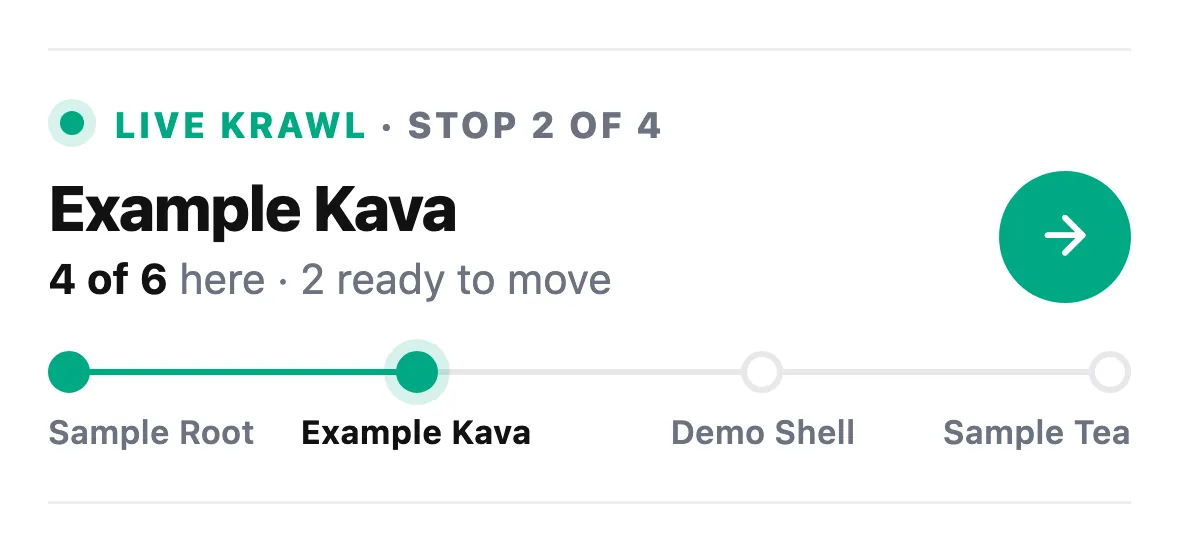
The live Krawl card shows a live dot, a rail of stops and one line that says what's happening now. Tap the arrow to open the full plan. It's smaller too, so you still have room for everything else on Home.
When the night is over
The card now goes away once the schedule ends, instead of sitting on stop one forever. Hosts can finish the Krawl from the top of the page, and anyone in the group can leave once it's done. The header stays pinned, with a way back to Home.
Shorter links that last
Copy link and Share invite now give you a short address, happykava.app/krawl/ and a code. Anyone can open the preview without an account. Joining still takes a sign-in, and unlisted Krawls still need the host's approval. Links keep showing the original Krawl after joining closes or the night ends.
Also improved
- The Krawl page respects your phone's screen edges when you open it from Home.
- Finished Krawls no longer highlight a current stop.
- Finish asks you to confirm first, so nobody ends the night by accident.