A blank page saying "No deals yet" doesn't tell you much. When a tool has nothing in it yet, it now explains what it does and how to start using it.
What you'll see
Open Deals, Team, Inbox, Tickets, Community Wall, Check-ins, Hosts or Regulars before you've used it. You'll see what the tool is for, a made-up preview of what guests or kavatenders see in the app, and numbered steps wired to the page's own buttons. Steps you've already done are checked off.
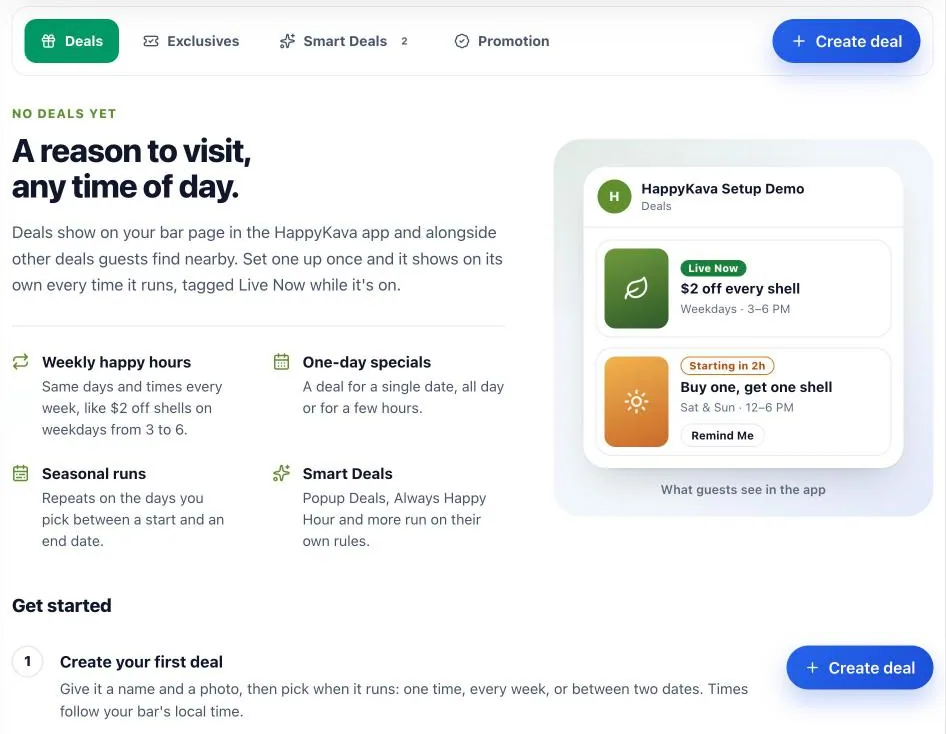
The guides only appear when a page is truly empty, and they follow what your role and plan can already do. Once you've added something, the regular page takes over.
Group Chat, too
Group Chat explains itself before anyone joins, shows the four join rules right on the page and walks you through inviting your first guests.
Your BULA RUSH numbers
The BULA RUSH card on Home and Analytics now reads the current game: plays, signed-in players, clears and check-ins after playing for the range you pick, plus the top five on your bar's level. Open BULA RUSH takes you to the full report.
Also improved
- A bar with no deals no longer sees a "no matches" message with nothing to clear.
- Regulars and Website Widgets no longer flash an upgrade message at paid bars.
- Regulars' examples now use the recommended levels: Rookie, Regular, Tribe and Legend.